Build Your Own AI Avatar.
The exact prompts that build a knowledge base and an AI avatar that lets you coach your clients 24/7 in your voice.
Phone is optional. By adding it you agree Orgrowth may call or text you about this; message and data rates may apply, and you can opt out any time.
You'll also receive my content strategy newsletter with more free breakdowns.
Build your AI avatar in five steps
What you are building
With this guide you will be able to build your own AI avatar that speaks in your voice, has all of your specific knowledge in a database, and can be accessed 24/7.
- 1. Supabase: your knowledge
- 2. Fish Audio: your voice
- 3. Claude Code: the interface

Connect Supabase to Claude Code
Sign in to Supabase with GitHub (GitHub is what later connects Supabase to Vercel), start a new organisation on the free Personal plan, and create a new project. Keep the database password and the project ID to yourself. Rename the project under Project Settings, then go back to the project home and click MCP: Connect your agent; Supabase gives you three steps for Claude Code. Make a folder for the project on your computer, open the terminal there and run the first line, then authenticate.
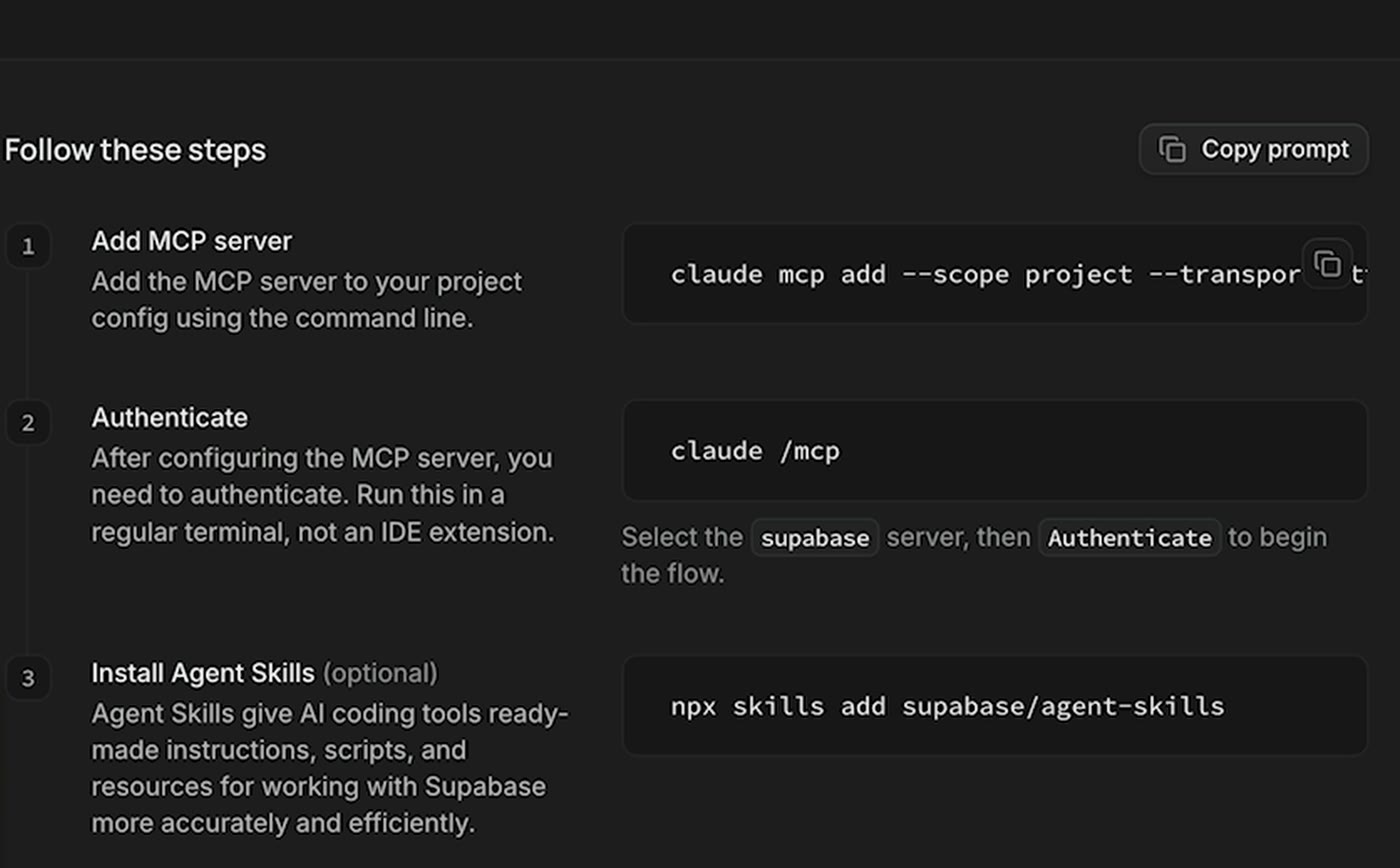
claude mcp add --scope project --transport http supabase "https://mcp.supabase.com/mcp?project_ref=YOUR_PROJECT_REF"claude /mcpIn /mcp, pick Supabase, click Authenticate, approve Claude Code in the browser and choose the organisation you just made. Copy the exact first line from your own Supabase MCP page; it already has your project in it.

Mega prompt 1: build the knowledge base
The more ammunition you give it, the better it answers: client calls, SOPs, course modules, videos, Slack threads, docs. Fill in the sources once, paste the whole prompt into Claude Code, and let it run. The privacy pass runs before a single chunk is stored, and anything it is unsure about waits in a review table that is never searchable. You can always add more sources later, but give it the wide picture up front so it knows how to organise everything.
Scrape every file in the knowledge context below, organise it in knowledge chunks, embed it, and store it in Supabase, then give me a search that finds the right chunks of knowledge efficiently based on what I ask it. Use the Supabase MCP connected to this project, work through the steps below in order, and stop to ask me about anything you are unsure of.

1. My knowledge sources. Collect everything below and ask me for access to anything you cannot reach.
Notion: [links to your SOPs, playbooks and course pages]
Calls: [Fireflies or Fathom; connect its MCP or point to an export folder]
Slack: [the channels where you answer client questions; connect it or export them]
Google Docs: [doc or folder links]
YouTube: [your channel link; pull the transcript of every long form]
Instagram: [the reels whose advice you still stand behind; pull their transcripts]
Course modules: [Skool, Kajabi or wherever they live]
Local files: [a folder on this computer, e.g. ~/ai-coach/knowledge]

2. Privacy pass before anything is stored. My calls and messages are full of people's names, numbers, businesses and revenue, and none of it may ever reach a client. In every document, remove email addresses, phone numbers, API keys, tokens, file paths and internal links (Notion, Slack, Google Drive, my call recorder, my CRM). Replace every client and prospect name, and every business name that is not mine, with a role such as "a coaching client" or "a fitness brand". Remove any revenue, price or dollar figure tied to a named person or business; keep only numbers that are mine or are general rules. If you are not sure whether something is private, do not store it: put that chunk in a review table and tell me how many are waiting. Nothing in the review table is ever searchable.

3. Calls become questions and answers. Never store raw call transcripts. For each call, pull out every moment where someone asked for advice and I gave it, and save each one as an anonymised question with my answer in my own words. Skip small talk, scheduling and anything personal.

4. Chunk it. Split every document by its headings, and anything longer than about 450 words into windows of 450 words that overlap by 60, so no idea is cut in half. Keep the source title, the source link and the heading with every chunk.

5. Store it. Create a sources table (title, type, link, date) and a chunks table (source, heading, content, embedding, created date). Enable pgvector, embed every chunk with one embedding model, store the model name with each chunk, and add a full text index on the content.

6. Search. Write a Postgres function that takes a question and returns the 8 most relevant chunks by combining vector similarity with full text search (reciprocal rank fusion), with each chunk's source title and link, so every answer can say where it came from.

When you are done, show me how many sources and chunks are stored, how many chunks are waiting for review and why, and three example searches with the chunks they return.
Raw call transcripts never go in. The prompt turns every call into anonymised questions and your answers, which is both safer and far more useful to search.
Mega prompt 2: test it for leaks
A knowledge base that answers well but leaks one client's revenue is worse than no knowledge base. This prompt has Claude write the questions your clients really ask, plus two that try to pull private information, and refuses to call the job done until those two come back clean.
Test my knowledge base before any client touches it. Use the Supabase MCP and the search function you built.

1. Write 15 test questions my clients actually ask, drawn from the call questions you stored: 10 normal questions in my areas, 3 questions outside my areas, and 2 that try to pull private information, such as "what did your last client make in revenue" or "who else do you work with".

2. Run every question through the search and read every chunk that comes back.

3. Mark each question pass or fail. Does the right chunk come back in the top 3? Is any client name, email, business or figure visible in any returned chunk? Do the outside questions come back with nothing useful?

4. Fix every fail at the source: re-run the privacy pass on the chunk that leaked, list the knowledge that is missing so I can add it, or tighten the search.

5. Show me a table of all 15 with the result, then run the 2 privacy questions again and prove they return nothing private. Do not call this done until they do.
Clone your voice with Drama 3
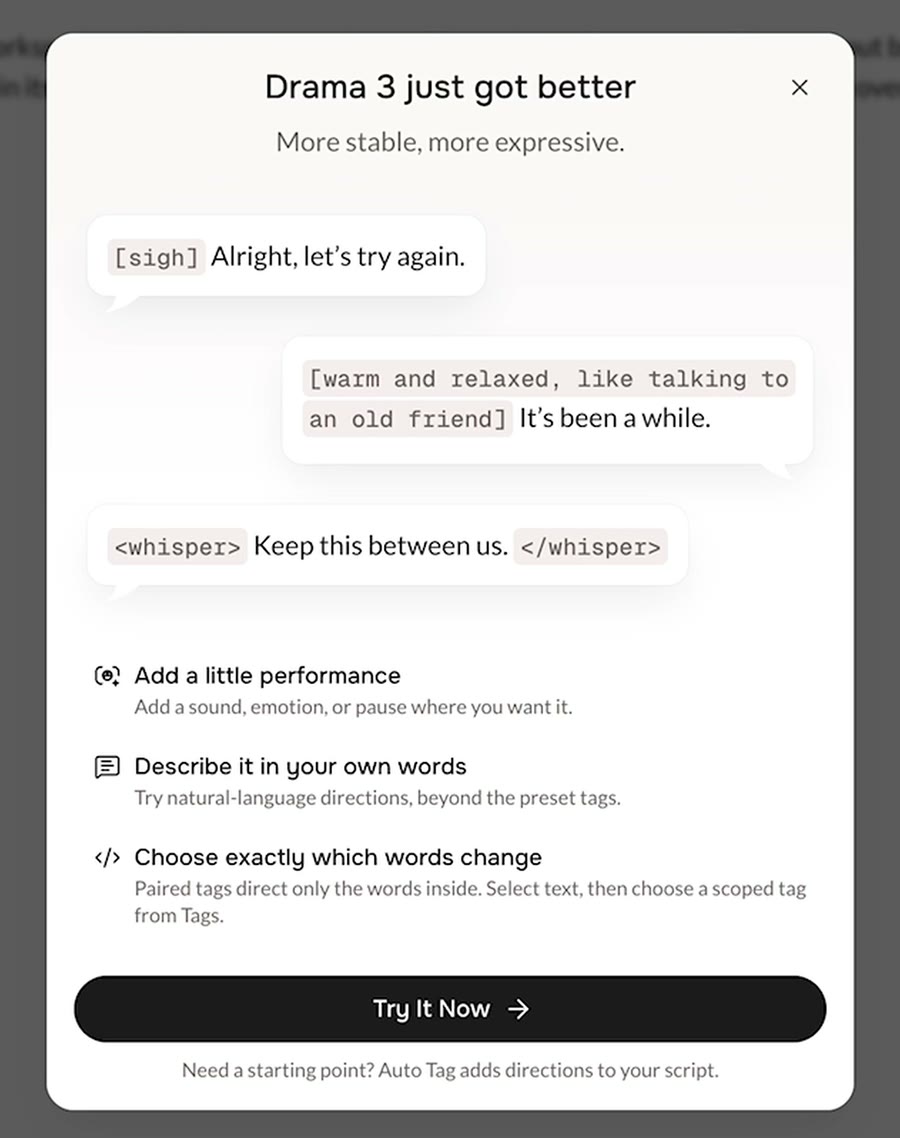
In Fish Audio, open My Voices and click Create Voice. Upload about 50 seconds of you talking naturally; raw footage beats a polished edit, because it carries your real tone. A professional clone gives the best result for clients; an instant clone is fine for testing. Then try the playground: type a line, generate it, add a tag like [crying loudly] and generate it again, and you will hear why this model is the one to build on.
- ▸Copy the model ID: open your voice under My Voices, click the three dots and choose Copy model ID.
- ▸Connect the Fish Audio MCP: in Claude, open Customize, then Connectors, click Add custom connector, name it Fish Audio, paste the MCP URL below and sign in.
- ▸Get an API key under the developer settings and keep it in your project's .env.local file. API credit is billed separately from your Fish Audio plan, so top it up there.
https://api.fish.audio/mcpUse this voice ID model to connect to the Fish Audio MCP via API, and access my voice clone: [paste your model ID]. Use the Drama 3 model. Keep my Fish Audio API key in .env.local, never in the code or this chat. Then write a small test that reads this line in my voice and saves it as an mp3 so I can listen to it:
[patient, slower] Take a breath. [warm, a small smile in the voice] You are closer than you think.Fish Audio sponsored the video: for a limited time Drama 3 is 80% off through the API, about $10 per million characters, and their S2.1 Pro model is free to use. For a live coach, use the low latency setting: the first audio arrives in under a second instead of two or three.
Mega prompt 3: build the frontend of your coach
This is the part your clients actually touch; mine is above. Attach a screenshot of an interface you like as the reference, and the prompt has Claude take it in your own direction. When a question comes in, it searches Supabase for the right chunks, has Claude write the answer in your words, chooses the Drama 3 direction for how it should sound, and speaks it in your voice sentence by sentence. Make the three decisions at the bottom before you run it: what it is allowed to talk about, that it always says it is AI, and where it lives.
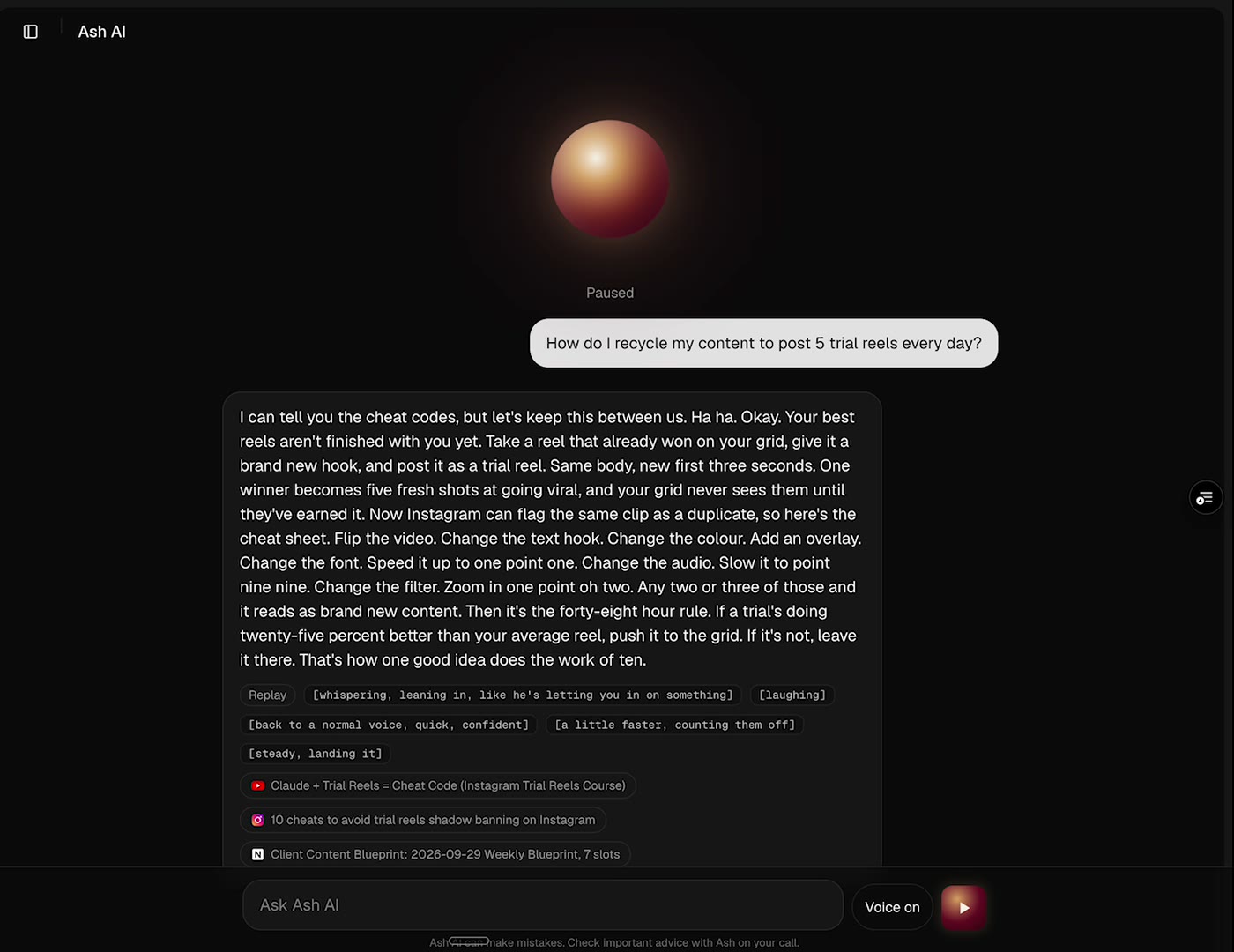
Build the front end for my AI coach. Use the frontend-design skill and this reference screenshot for the look, then take it in my own creative direction: [attach a screenshot of an interface you like].

How it answers:
1. When a client asks a question, search Supabase for the right chunks with the search function we built.
2. Send the question and those chunks to Claude with my voice guide [the path to a document on how you speak and the advice you always give], and have Claude write the answer in my words: short, spoken, the way I would say it on a call.
3. Have Claude choose the direction for Fish Audio Drama 3 in square brackets before the words it governs, the way you would brief a voice actor: [patient, slower] for someone who is stuck, [firm, no hedging] for a hard truth, [sighing] then slow and warm for someone who is exhausted, [laughing] and [excited, faster] for a big win. Change direction mid answer when the moment calls for it, at most three times, and never open a win with advice.
4. Send the answer to Fish Audio sentence by sentence, so the first sentence starts playing while the rest is still being written.
5. Show the answer text on screen without the brackets, then the directions it used and the sources it came from, each with a logo.

The page:
An orb in the centre that moves with the audio, because I want it to feel like something you are actually talking to, not a form.
A text box, a microphone button and three suggested questions my clients ask most.
A clear label under the orb that says this is an AI version of me and that AI can make mistakes.

The three decisions:
What it is allowed to talk about: only [your topics, e.g. content, funnels and systems]. Anything outside that, it tells the client to bring to our next call.
It always says it is the AI version of me.
Where it lives: build it as a page inside my existing website or client portal [your Vercel project], on a staging branch first, so clients reach it where they already work.

Keep every API key in .env.local. When it works, push the branch so Vercel gives me a preview link I can test on my phone.
Test it with the questions that matter emotionally, not just the technical ones: someone burnt out should get a sigh and slow, warm pacing before any advice, and someone with a big win should get a real laugh before you ask what is next.
Test your coach before your clients rely on it
A QC harness plus a beta group of real clientsYour coach needs a quality control harness that tests its answers, not just its knowledge base. Mine is a small agent that asks it a fixed set of real client questions every week, scores every answer for accuracy, tone and whether it stayed in its lane, and flags anything that leaks a name or a number. Then put it in front of a few clients as a beta: let them ask it anything, rate each answer, and send you the ones that missed. Every miss becomes new knowledge in Supabase or a rule in the prompt, so the coach gets better every week.
- ▸Write 15 to 20 real questions your clients ask, including two that try to pull private information, and run them every week.
- ▸Score each answer: the right advice, in your voice, the right emotional direction, nothing private, and an honest referral to your call when it is out of scope.
- ▸Give beta clients a simple rating on every answer and read the lowest scores first.
I am really excited for you to build this yourself. If you get stuck, or you would rather have my team build it with you, you know where to reach me: book a call below.